For many people, sending a brand a direct message or leaving a comment is now the most natural way to ask a question or raise a problem. That makes social media customer service a core part of how customers experience your business, not an optional extra handled when someone has a spare minute.
Done well, it builds trust in public and turns frustrated customers into loyal ones. Done badly, it can leave unanswered complaints sitting on your profile for everyone to see. This guide explains how to handle comments and DMs in a way that is fast, human and sustainable.
Why social media customer service matters
Social platforms are different from email or phone support in one important way: much of the conversation happens in public. When you reply helpfully to a comment, you are not only helping that person; you are showing every future visitor how you treat customers.
Social support also tends to be informal and immediate. People expect a reply in hours rather than days, and they expect a real person rather than a script. Meeting those expectations consistently is what separates brands that feel approachable from those that feel distant.
Set up the foundations first
Before you can respond well, you need to know who is responding, when, and with what information.
Decide who owns the inbox
Name the people responsible for social replies and make sure there is cover for holidays, evenings and busy periods. Unclear ownership is the most common reason messages go unanswered.
Publish your support hours
Add your response hours to your profile bio or an automated greeting. Customers are far more patient when they know when to expect a reply.
Agree response time targets
Set internal targets for first response, for example within a few hours during business hours. Track them, but focus on being genuinely helpful rather than simply fast.
Create a knowledge base for your team
Gather answers to common questions, links to policies, escalation contacts and approved wording for sensitive situations in one shared document.
How to handle comments on your posts
Comments range from praise and questions to complaints and the occasional troll. Each type deserves a slightly different approach:
- Positive comments: thank people by name where possible and add something personal. A short, warm reply encourages more conversation.
- Questions: answer publicly if the answer helps others too, such as product details or opening times. Keep it concise and link to more information if needed.
- Complaints: acknowledge the issue publicly, apologize where appropriate, and invite the person to continue in private messages so you can deal with account details safely.
- Spam and abuse: hide or remove content that breaks your community guidelines, but avoid deleting genuine criticism, which can make things worse.
How to handle direct messages
DMs are where most real problem-solving happens, because customers can share order numbers and personal details privately. A simple structure keeps conversations efficient:
- Greet and acknowledge. Use their name and show you understand the issue.
- Ask only for what you need. Request the specific details required to help, and never ask for passwords or full payment details.
- Resolve or set expectations. Solve the problem if you can. If not, explain the next step and when they will hear back.
- Close the loop. Confirm the issue is resolved and thank them for their patience.
Saved reply templates speed this up, but always personalize them. Customers can tell when they are receiving a copy-and-paste response, and it rarely improves their mood.
Handling complaints and difficult conversations
Negative feedback in public can feel uncomfortable, but it is also a chance to show your values. A few principles help:
- Respond quickly, even if you do not have the full answer yet. Silence often reads as indifference.
- Stay calm and factual. Never argue or become defensive, however unfair the comment seems.
- Take ownership. Acknowledge what went wrong without making excuses.
- Move details offline. Shift to DMs, email or phone to handle specifics privately.
- Follow up publicly when appropriate. A short note that the issue has been sorted reassures others reading the thread.
Agree in advance when to escalate, for example legal threats, safety issues or anything likely to attract press attention, and who should be contacted.
Scaling social media customer service with the right tools
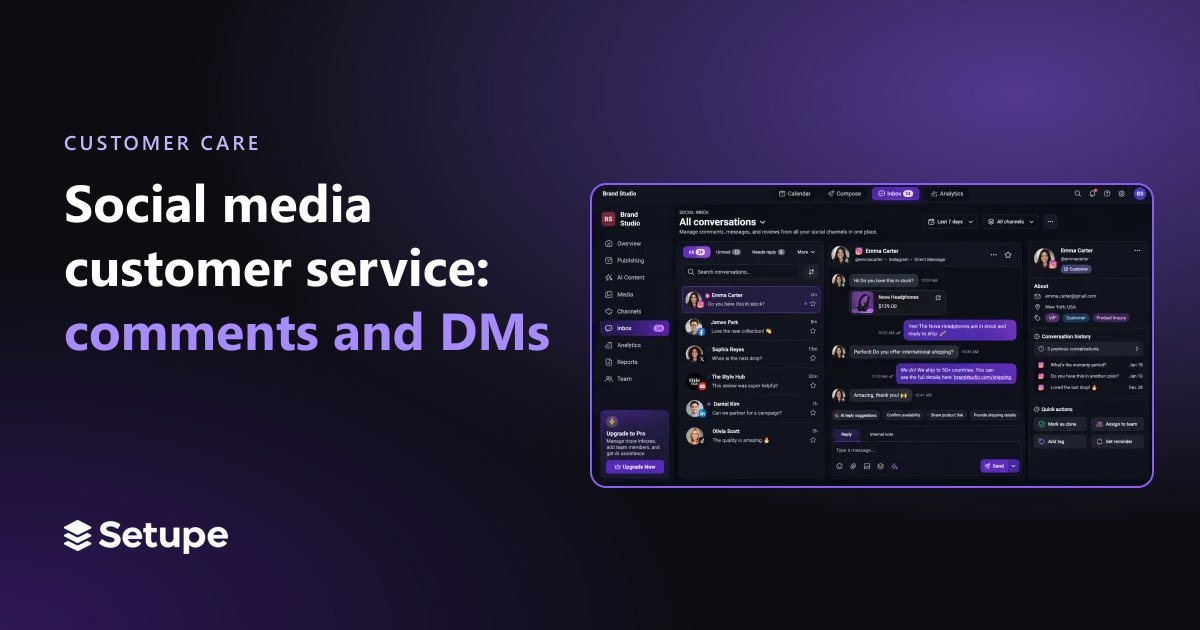
As message volume grows, switching between platforms to find new comments becomes unworkable. A unified social inbox brings comments and messages from all your connected accounts into one place, so nothing slips through the cracks and team members can see what has already been handled.
Setupe's social inbox is designed for this, and it pairs well with keyword-based auto-replies. When a message contains a common phrase such as a delivery question, an automatic response can point the customer to the right information straight away. For less predictable messages, AI-drafted answers give your team a suggested reply to review and edit, which saves time without removing the human touch. Team workspaces then make it easy to share the load across colleagues.
Automation should support people, not replace them. Use it for routine queries and first responses, and make sure a person reviews anything sensitive or complex.
Measuring how well you are doing
Track a small set of measures each month: average first response time, the share of messages answered, how many issues are resolved without escalation, and the overall tone of conversations. Look for patterns too. If the same question keeps arriving, it may be a sign to update your website, product information or a pinned post. Customer service conversations are also a goldmine of content ideas, so share recurring questions with whoever plans your posts.
Frequently asked questions
How quickly should brands reply on social media?
As quickly as you realistically can while still being helpful. Set clear targets, publish your support hours, and use automated acknowledgements so customers know their message has been received.
Should I delete negative comments?
Generally no. Deleting genuine criticism can look like you are hiding something. Respond professionally instead, and only remove content that is abusive, spam or breaks your community guidelines.
Can auto-replies feel impersonal?
They can if overused. Keep them short and friendly, use them for simple and predictable questions, and make it easy for customers to reach a real person when they need one.
Great social media customer service comes down to clear ownership, consistent response times, a calm and human tone, and tools that keep every conversation in view. Put those foundations in place and your social channels become a genuine asset for customer loyalty.
Ready to bring every comment and message into one organized inbox? Create your Setupe account and start delivering faster, friendlier support.